---
title: "Top Bottom (Style G) Template & Dieline Generator | Carton Maker"
description: "Top Bottom Style G is a tray blank with narrow side returns and triangular locking details beside the end walls."
canonical_url: "https://cartonmaker.in/design/top-bottom-style-g"
meta:
"og:description": "Top Bottom Style G is a tray blank with narrow side returns and triangular locking details beside the end walls."
"og:image": "https://cartonmaker.in/imgs/designs/TopBottomG.png"
"og:image:alt": "Top Bottom (Style G) flat dieline preview"
"og:title": "Top Bottom (Style G) Template & Dieline Generator"
"twitter:description": "Top Bottom Style G is a tray blank with narrow side returns and triangular locking details beside the end walls."
"twitter:image": "https://cartonmaker.in/imgs/designs/TopBottomG.png"
"twitter:title": "Top Bottom (Style G) Template & Dieline Generator"
---
> Index of every page on this site: [llms.txt](https://cartonmaker.in/llms.txt)
## **Choose Your Plan**
Select credits or subscription
# **Top Bottom (Style G) Template & Dieline Generator**
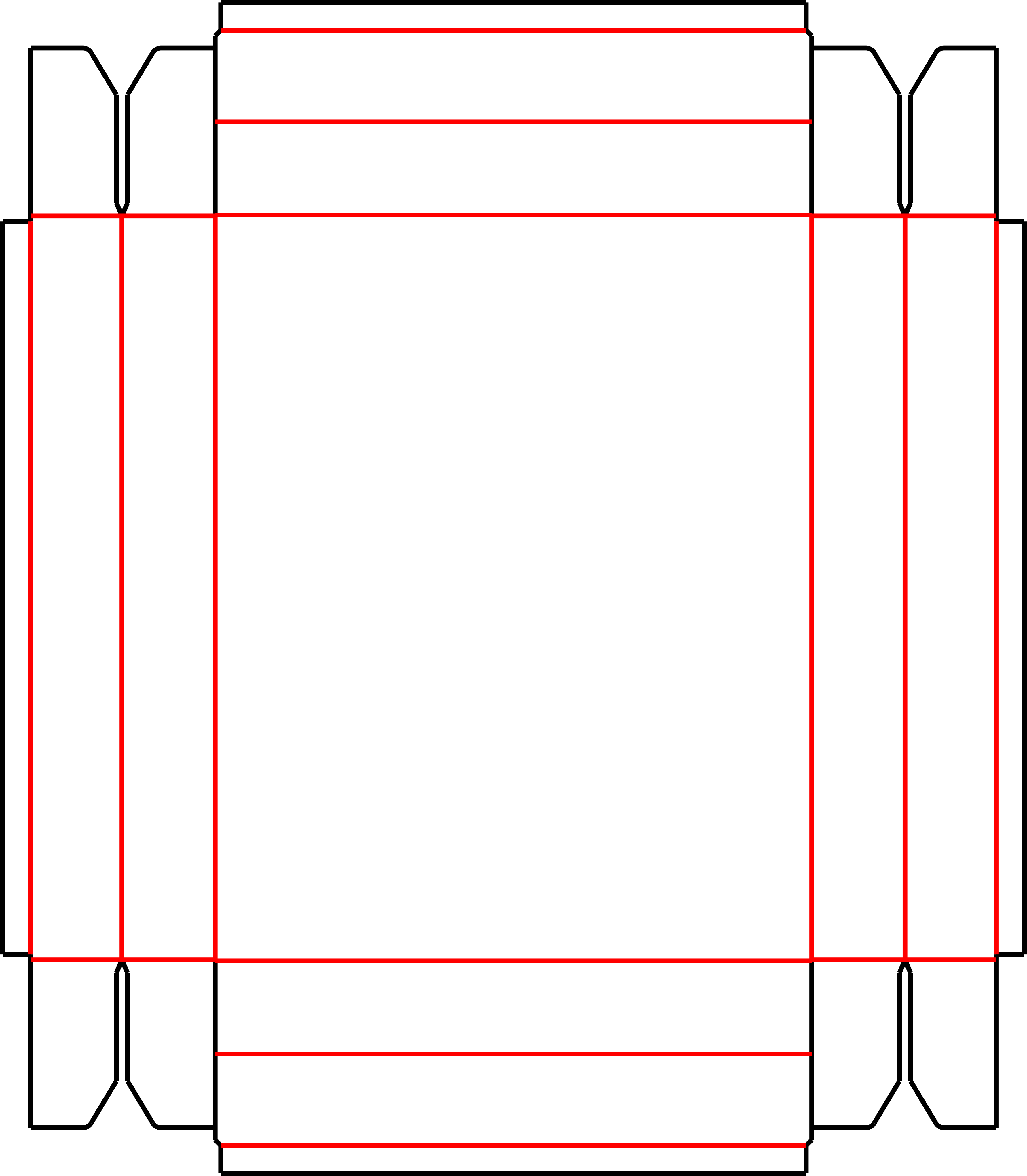
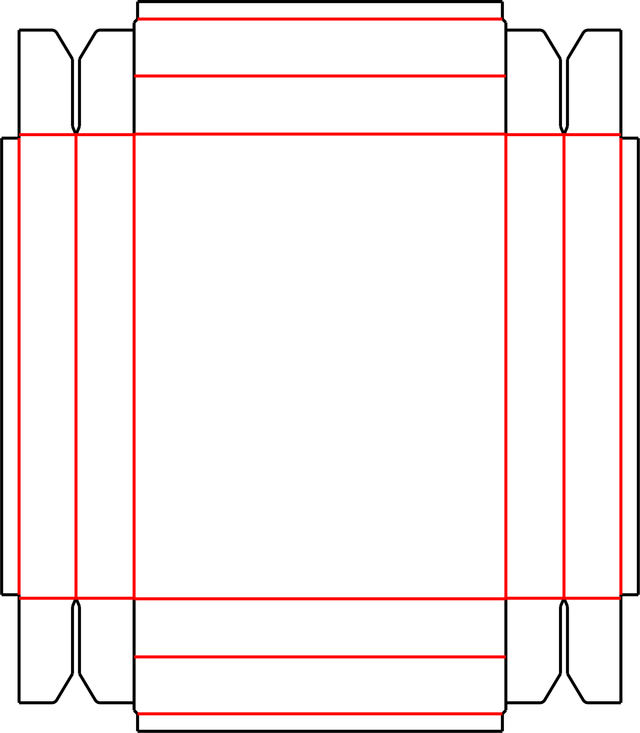
Top Bottom Style G is a tray blank with narrow side returns and triangular locking details beside the end walls.
The preview shows long wall strips and small diagonal corner pieces. Compare these locking profiles with the cut slots of Styles H and I before selecting a tray construction. Make a sample to verify that the corner tabs engage without distorting the base.
Sign in to edit dimensions. PDF and DXF downloads use export credits.
| Categories | Top Bottom Box |
| --- | --- |
| Customizable | Dimensions and available construction controls |
| Export | PDF and DXF with export credits |
[Open editor](https://cartonmaker.in/design/editor/top-bottom-style-g) [Export credits & pricing](https://cartonmaker.in/pricing)
## **How to use this template**
1. ### 1**Open template**
Open the Top Bottom (Style G) template in Carton Maker.
2. ### 2**Adjust dimensions**
Sign in and adjust the dimensions and available construction controls.
3. ### 3**Review and export**
Check the dieline, preview the fold, and export as PDF or DXF.
Make and check a physical sample with your intended material before production.
## **What you can do**
### **Edit dimensions**
Adjust the size and available construction controls.
### **3D folding preview**
Inspect the folded model where available.
### **PDF / DXF export**
Download production-ready dieline files with credits.
### **Multi-ups & nesting**
Arrange multiple copies on a sheet.
### **Notching & locking**
Adjust available notching and locking details.
### **Measure & check**
Review dimensions and sheet settings.
## **Related templates**
[**View all templates **](https://cartonmaker.in/design)
[**Top Bottom (Style A)**
](https://cartonmaker.in/design/top-bottom-style-a) [**Top Bottom (Style B)**
](https://cartonmaker.in/design/top-bottom-style-b) [**Top Bottom (Style C)**
](https://cartonmaker.in/design/top-bottom-style-c) [**Top Bottom (Style D)**
](https://cartonmaker.in/design/top-bottom-style-d)
## **FAQ**
**Can I change the dimensions of this template?**
Yes. Open the editor and sign in to adjust the dimensions and available construction controls.
**Can I export the dieline as PDF or DXF?**
Yes. PDF and DXF exports require a signed-in account with valid export access and available credits.
**Should I make a sample before production?**
Yes. Check scale, material thickness, fit, and assembly with a physical sample and your printer or die maker.
A structural template does not certify a material or finished package for a particular product. See [current pricing](https://cartonmaker.in/pricing) for export options.
## **Customize this template**
**in Carton Maker**
Edit dimensions, preview in 3D and export production-ready dielines. Sign in to use your credits.
[Open in editor](https://cartonmaker.in/design/editor/top-bottom-style-g)
```json
{"@context":"https://schema.org","@graph":[{"@type":"WebPage","@id":"https://cartonmaker.in/design/top-bottom-style-g#webpage","url":"https://cartonmaker.in/design/top-bottom-style-g","name":"Top Bottom (Style G) Template & Dieline Generator","description":"Top Bottom Style G is a tray blank with narrow side returns and triangular locking details beside the end walls.","primaryImageOfPage":{"@id":"https://cartonmaker.in/design/top-bottom-style-g#preview"}},{"@type":"ImageObject","@id":"https://cartonmaker.in/design/top-bottom-style-g#preview","contentUrl":"https://cartonmaker.in/imgs/designs/TopBottomG.png","caption":"Top Bottom (Style G) flat dieline preview"}]}
```
```json
{"@context":"https://schema.org","@type":"BreadcrumbList","itemListElement":[{"@type":"ListItem","position":1,"name":"Home","item":"https://cartonmaker.in/"},{"@type":"ListItem","position":2,"name":"Dieline Templates","item":"https://cartonmaker.in/design"},{"@type":"ListItem","position":3,"name":"Top Bottom (Style G)","item":"https://cartonmaker.in/design/top-bottom-style-g"}]}
```
```json
{"@context":"https://schema.org","@graph":[{"@id":"https://cartonmaker.in/#website","@type":"WebSite","name":"Carton Maker","url":"https://cartonmaker.in/","publisher":{"@id":"https://cartonmaker.in/#identity"}},{"@id":"https://cartonmaker.in/design/top-bottom-style-g#webpage","@type":"WebPage","description":"Top Bottom Style G is a tray blank with narrow side returns and triangular locking details beside the end walls.","name":"Top Bottom (Style G) Template & Dieline Generator","url":"https://cartonmaker.in/design/top-bottom-style-g","isPartOf":{"@id":"https://cartonmaker.in/#website"},"potentialAction":[{"@type":"ReadAction","target":["https://cartonmaker.in/design/top-bottom-style-g"]}],"primaryImageOfPage":{"@id":"https://cartonmaker.in/#logo"}},{"@id":"https://cartonmaker.in/#identity","@type":"Organization","description":"Carton Maker is an online dieline generator that allows users to create custom packaging box dielines quickly and easily. With a user-friendly interface and a wide range of templates, Carton Maker simplifies the process of designing and visualizing packaging boxes for various products.","email":"cartonmaker.app@gmail.com","foundingDate":"2014-09-09","name":"Carton Maker","telephone":"+918655561715","url":"https://cartonmaker.in","contactPoint":{"@type":"ContactPoint","telephone":"+918655561715","contactType":"Customer Support","availableLanguage":["English","Hindi"]},"logo":{"@id":"https://cartonmaker.in/#logo"},"sameAs":["https://www.youtube.com/@cartonmaker4","https://www.instagram.com/cartonmaker.app/"]},{"@id":"https://cartonmaker.in/#logo","@type":"ImageObject","caption":"Carton Maker","contentUrl":"https://cartonmaker.in/imgs/logo.png","inLanguage":"en","url":"https://cartonmaker.in/imgs/logo.png"}]}
```
## Sitemap
See the full [sitemap](https://cartonmaker.in/sitemap.md) for all pages.