---
title: "Popcorn Template & Dieline Generator | Carton Maker"
description: "Popcorn is a tapered open-top carton template with angled wall panels and shaped bottom flaps."
canonical_url: "https://cartonmaker.in/design/popcorn"
meta:
"og:description": "Popcorn is a tapered open-top carton template with angled wall panels and shaped bottom flaps."
"og:image": "https://cartonmaker.in/imgs/designs/Popcorn.png"
"og:image:alt": "Popcorn flat dieline preview"
"og:title": "Popcorn Template & Dieline Generator"
"twitter:description": "Popcorn is a tapered open-top carton template with angled wall panels and shaped bottom flaps."
"twitter:image": "https://cartonmaker.in/imgs/designs/Popcorn.png"
"twitter:title": "Popcorn Template & Dieline Generator"
---
> Index of every page on this site: [llms.txt](https://cartonmaker.in/llms.txt)
## **Choose Your Plan**
Select credits or subscription
# **Popcorn Template & Dieline Generator**
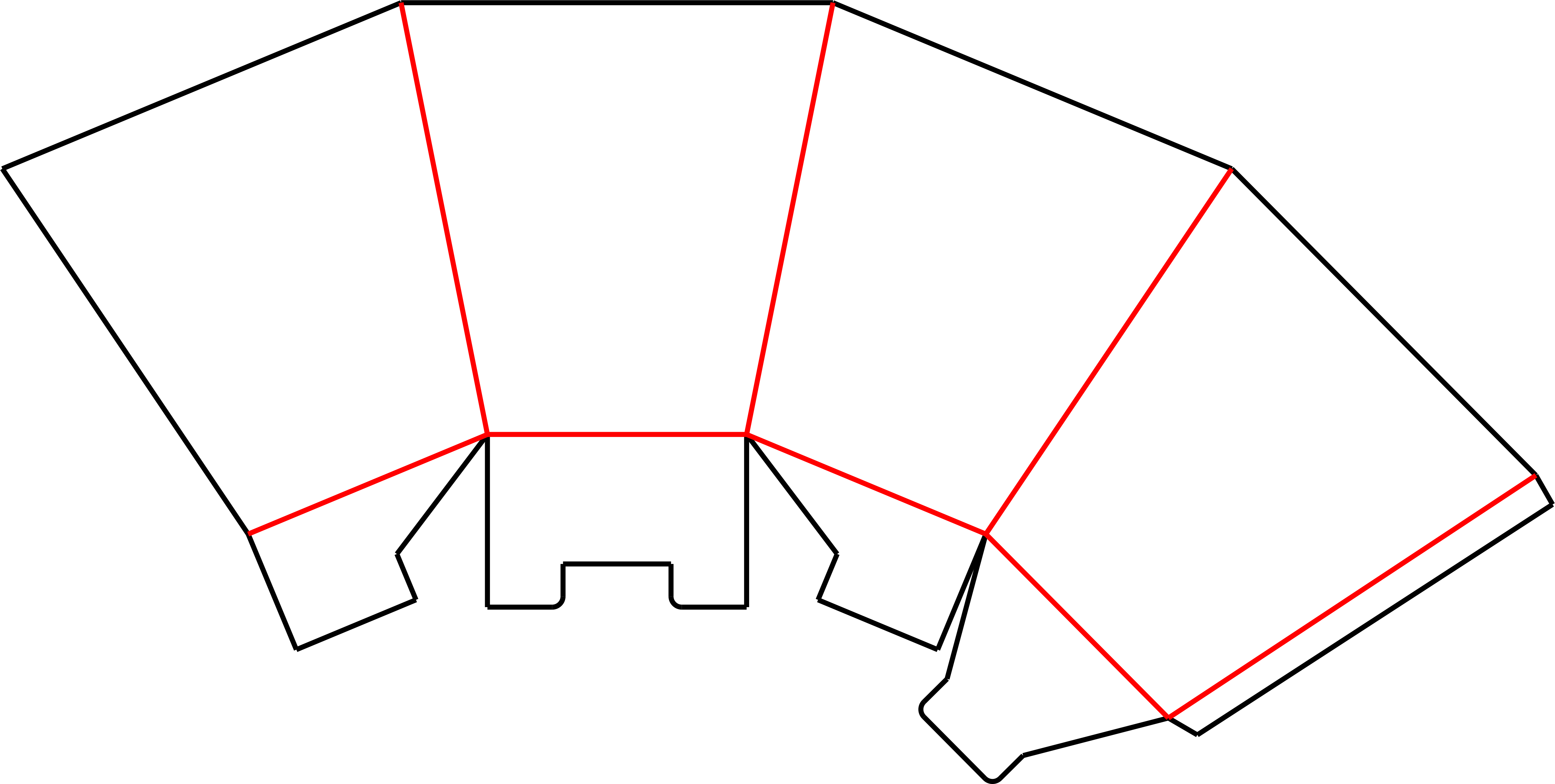
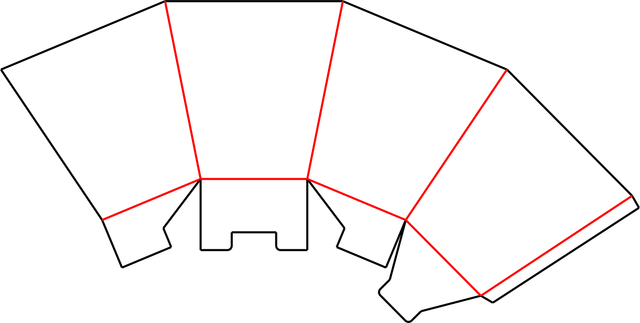
Popcorn is a tapered open-top carton template with angled wall panels and shaped bottom flaps.
The flat blank spreads the four walls outward, producing a wider opening than the base when folded. Use it to plan a popcorn-style snack pack and position artwork across the tapered panels. Check the bottom assembly and intended food-contact material independently of the dieline.
Sign in to edit dimensions. PDF and DXF downloads use export credits.
| Categories | Food Packaging |
| --- | --- |
| Customizable | Dimensions and available construction controls |
| Export | PDF and DXF with export credits |
[Open editor](https://cartonmaker.in/design/editor/popcorn) [Export credits & pricing](https://cartonmaker.in/pricing)
## **How to use this template**
1. ### 1**Open template**
Open the Popcorn template in Carton Maker.
2. ### 2**Adjust dimensions**
Sign in and adjust the dimensions and available construction controls.
3. ### 3**Review and export**
Check the dieline, preview the fold, and export as PDF or DXF.
Make and check a physical sample with your intended material before production.
## **What you can do**
### **Edit dimensions**
Adjust the size and available construction controls.
### **3D folding preview**
Inspect the folded model where available.
### **PDF / DXF export**
Download production-ready dieline files with credits.
### **Multi-ups & nesting**
Arrange multiple copies on a sheet.
### **Notching & locking**
Adjust available notching and locking details.
### **Measure & check**
Review dimensions and sheet settings.
## **Related templates**
[**View all templates **](https://cartonmaker.in/design)
[**Pizza Box**
](https://cartonmaker.in/design/pizza-box-style-a) [**Pastry Box**
](https://cartonmaker.in/design/pastry-box-style-a) [**End Meet Carton**
](https://cartonmaker.in/design/end-meet-style-b) [**Tray (Style A)**
](https://cartonmaker.in/design/tray-style-a)
## **FAQ**
**Can I change the dimensions of this template?**
Yes. Open the editor and sign in to adjust the dimensions and available construction controls.
**Can I export the dieline as PDF or DXF?**
Yes. PDF and DXF exports require a signed-in account with valid export access and available credits.
**Should I make a sample before production?**
Yes. Check scale, material thickness, fit, and assembly with a physical sample and your printer or die maker.
A structural template does not certify a material or finished package for a particular product. See [current pricing](https://cartonmaker.in/pricing) for export options.
## **Customize this template**
**in Carton Maker**
Edit dimensions, preview in 3D and export production-ready dielines. Sign in to use your credits.
[Open in editor](https://cartonmaker.in/design/editor/popcorn)
```json
{"@context":"https://schema.org","@graph":[{"@type":"WebPage","@id":"https://cartonmaker.in/design/popcorn#webpage","url":"https://cartonmaker.in/design/popcorn","name":"Popcorn Template & Dieline Generator","description":"Popcorn is a tapered open-top carton template with angled wall panels and shaped bottom flaps.","primaryImageOfPage":{"@id":"https://cartonmaker.in/design/popcorn#preview"}},{"@type":"ImageObject","@id":"https://cartonmaker.in/design/popcorn#preview","contentUrl":"https://cartonmaker.in/imgs/designs/Popcorn.png","caption":"Popcorn flat dieline preview"}]}
```
```json
{"@context":"https://schema.org","@type":"BreadcrumbList","itemListElement":[{"@type":"ListItem","position":1,"name":"Home","item":"https://cartonmaker.in/"},{"@type":"ListItem","position":2,"name":"Dieline Templates","item":"https://cartonmaker.in/design"},{"@type":"ListItem","position":3,"name":"Popcorn","item":"https://cartonmaker.in/design/popcorn"}]}
```
```json
{"@context":"https://schema.org","@graph":[{"@id":"https://cartonmaker.in/#website","@type":"WebSite","name":"Carton Maker","url":"https://cartonmaker.in/","publisher":{"@id":"https://cartonmaker.in/#identity"}},{"@id":"https://cartonmaker.in/design/popcorn#webpage","@type":"WebPage","description":"Popcorn is a tapered open-top carton template with angled wall panels and shaped bottom flaps.","name":"Popcorn Template & Dieline Generator","url":"https://cartonmaker.in/design/popcorn","isPartOf":{"@id":"https://cartonmaker.in/#website"},"potentialAction":[{"@type":"ReadAction","target":["https://cartonmaker.in/design/popcorn"]}],"primaryImageOfPage":{"@id":"https://cartonmaker.in/#logo"}},{"@id":"https://cartonmaker.in/#identity","@type":"Organization","description":"Carton Maker is an online dieline generator that allows users to create custom packaging box dielines quickly and easily. With a user-friendly interface and a wide range of templates, Carton Maker simplifies the process of designing and visualizing packaging boxes for various products.","email":"cartonmaker.app@gmail.com","foundingDate":"2014-09-09","name":"Carton Maker","telephone":"+918655561715","url":"https://cartonmaker.in","contactPoint":{"@type":"ContactPoint","telephone":"+918655561715","contactType":"Customer Support","availableLanguage":["English","Hindi"]},"logo":{"@id":"https://cartonmaker.in/#logo"},"sameAs":["https://www.youtube.com/@cartonmaker4","https://www.instagram.com/cartonmaker.app/"]},{"@id":"https://cartonmaker.in/#logo","@type":"ImageObject","caption":"Carton Maker","contentUrl":"https://cartonmaker.in/imgs/logo.png","inLanguage":"en","url":"https://cartonmaker.in/imgs/logo.png"}]}
```
## Sitemap
See the full [sitemap](https://cartonmaker.in/sitemap.md) for all pages.