---
title: "Master Box Design in Minutes: A Step-by-Step Guide to Carton Maker"
description: "Ever wished you could create packaging box dielines in seconds instead of spending hours on manual work? Carton Maker makes that dream a reality! Whether you're crafting a pizza box, medicine box, or a stylish gift box, this tool automates the design process—saving you time and effort. Ready to see how simple it is? Let's dive in!"
canonical_url: "https://cartonmaker.in/blog/how-to-generate-box-dielines"
---
> Index of every page on this site: [llms.txt](https://cartonmaker.in/llms.txt)
# Master Box Design in Minutes: A Step-by-Step Guide to Carton Maker
Ever wished you could create **packaging box dielines** in seconds instead of spending hours on manual work? **Carton Maker** makes that dream a reality! Whether you're crafting a **pizza box, medicine box, or a stylish gift box**, this tool automates the design process—saving you time and effort. Ready to see how simple it is? Let's dive in!
### **Step 1: Choose Your Box Design**
Your first step is selecting the type of box you need. **Carton Maker** offers an extensive collection of pre-made templates covering various packaging needs. From food packaging to retail boxes, there's a perfect dieline for every requirement.
🔎 **Explore all designs here:** [Carton Maker Designs](https://cartonmaker.in/design)

### **Step 2: Enter Box Dimensions**
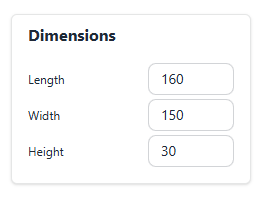
Once you've picked a design, it's time to customize it to your exact specifications. Simply enter:
📏 **Length**
📏 **Width**
📏 **Height**
With just these three details, **Carton Maker** generates a dieline tailored to your needs. No complicated calculations or guesswork—just instant results!
### **Step 3: Customize with Advanced Settings** *(Optional but Powerful!)*
Want to optimize your design for production? Check out these smart features:
✅ **Enable Multiup** – Fit multiple dielines on a single sheet, reducing material waste.
✅ **BOBST Layout** – Perfectly arranges dielines for smooth cutting and folding.
✅ **Automatic Arrange Layout** – Helps maximize sheet utilization efficiently.
Just **toggle the options** that work for your project, and you're good to go!

### **Step 4: Get Real-Time Estimates**
Beyond dielines, **Carton Maker** provides real-time estimates to help with production planning:
📌 **Total Cutting & Creasing Blades Required** – Know exactly how many blades are needed.
📌 **Sheets Required for Production** – For example, estimate that you need **500 sheets** to produce **2000 boxes**.
These insights make it easier to plan materials and reduce waste, ensuring a cost-effective production process.

### **Step 5: Export and Done!**
In just a few clicks, you're ready to roll. **Carton Maker** generates a professional dieline that’s 100% compatible with **AutoCAD and CorelDraw**—so you can seamlessly move from design to production.
🚀 Click **Export**, and you're done!
---
### **Why Carton Maker?**
🔥 **Speed:** Create dielines in seconds instead of 30-45 minutes.
🔥 **Precision:** No errors, no miscalculations—just perfect dielines.
🔥 **Seamless Workflow:** Direct compatibility with industry-standard software.
🔥 **Offline Access:** No internet? No problem! Work from anywhere.
🔥 **Production Estimates:** Plan materials efficiently with real-time insights.
---
### **Start Designing Smarter Today!**
With **Carton Maker**, you can **design, customize, and export** packaging dielines faster than ever. Say goodbye to tedious manual work and hello to effortless precision. Ready to transform your workflow? Give it a try today!
🔗 **Explore Carton Maker:** [Carton Maker](https://cartonmaker.in/design)
## Sitemap
See the full [sitemap](https://cartonmaker.in/sitemap.md) for all pages.